Link to my game: Code Invaders
For my assignment, the second prototype that I made was a Space Invaders clone with the help of tutorial videos provided to me through Canvas. The game was made using Unity, and I integrated FMod to include a sound effect that was edited with Adobe Audition.
The premise of Space Invaders is that the player is a turret that needs to shoot projectiles travelling towards their side of the screen, if the player character is unable to do this and an enemy makes it to their objective, the player loses.
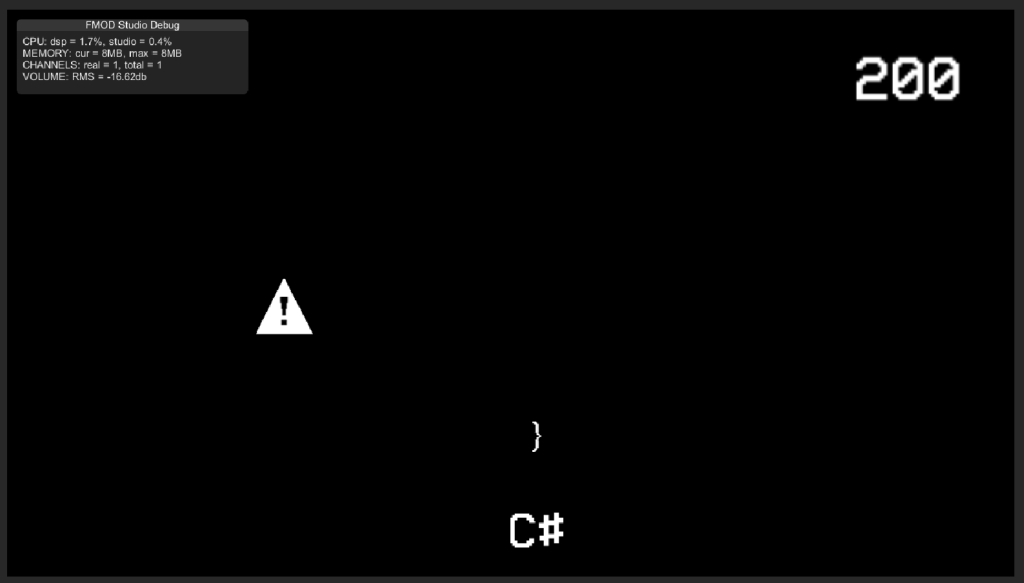
When choosing my own theme when making the game I decided to make it a coding theme. The way it works it that the player needs to prevent errors in the script by shooting semi-colons at the error icons coming down from the top of the screen. This led me to appropriately name the game, Code Invaders.
Scripting
Most of the scripts that I implemented into my game were from the tutorial videos on Canvas. I say “most” because I used an additional script that I found on YouTube to improve the player’s experience.
The first script that was used for the game is the Player Behaviour script.
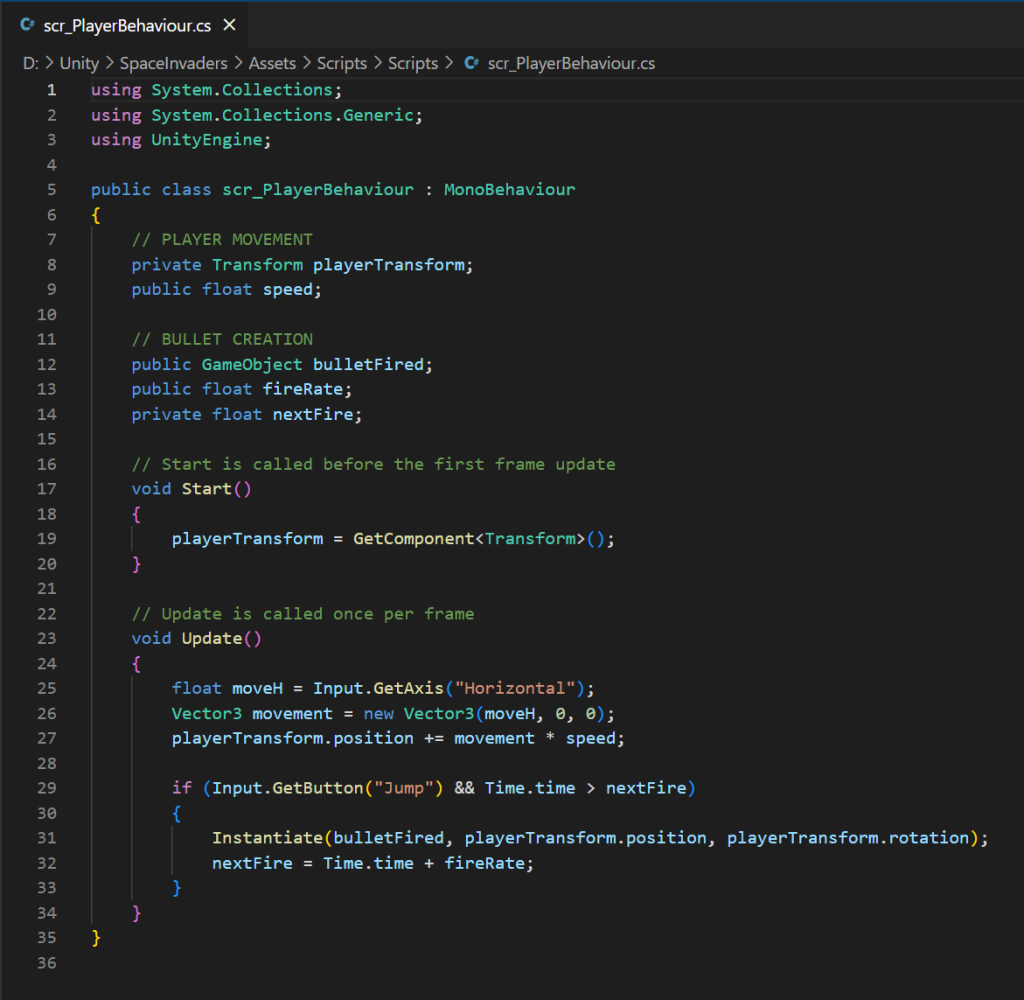
One of the purposes of this script is to allow the player to move their character shown on the screen by pressing the horizontal input buttons built into Unity (a, d, left arrow, right arrow). The player speed is determined by the public float variable “speed” which can be manually changed within the sprite’s inspector menu. When this variable is set, the higher it is the faster the player will be able to move in the game. If the speed is too high it will begin to become difficult to accurately control the player character which will then negatively affect the player experience.
The other purpose of this script is that it is one of the scripts that allow the player to shoot projectiles at the enemies. This also includes a cool-down between each shot to prevent the player form spamming the shoot button which would remove a high moderate amount of the game’s difficulty, making it too easy and therefore adding no challenge.
The script allows the player to shoot by spawning the bulletfired game object when the function has began. The game object being the bullet prefab.
The shooting cool-down is caused by the “if” function within the void update, which makes it so that the function will not operate unless Time.time is more than the nextFire variable.
The second script that was written during the making of this game is the Bullet Behaviour c# script.
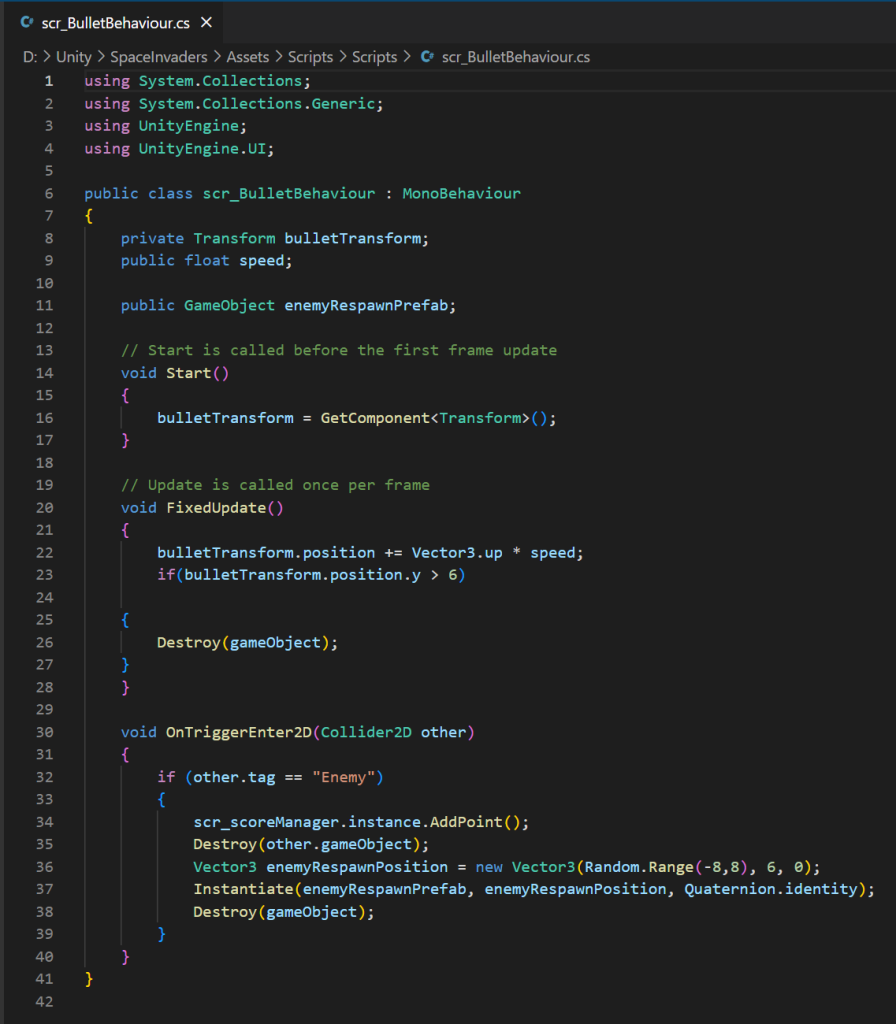
Within the FixedUpdate function is what makes the bullet move once it has spawned and the velocity of this can be altered in the prefab’s inspector menu like the player sprite. The function will also destroy the object if it travels beyond a certain threshold which I have set to y position 6. This is to prevent lag as after a while as there would be hundreds of rendered bullets travelling at once.
The OnTriggerEnter2D function makes it so that both the bullet and enemy get destroyed when they collide with each other. The game will then spawn another enemy from the prefab at a random range above the screen.
This script mentions a reference to an AddPoint function which is the last script that’ll be mentioned later.
The third script that is used in the game is the Enemy Behaviour script.
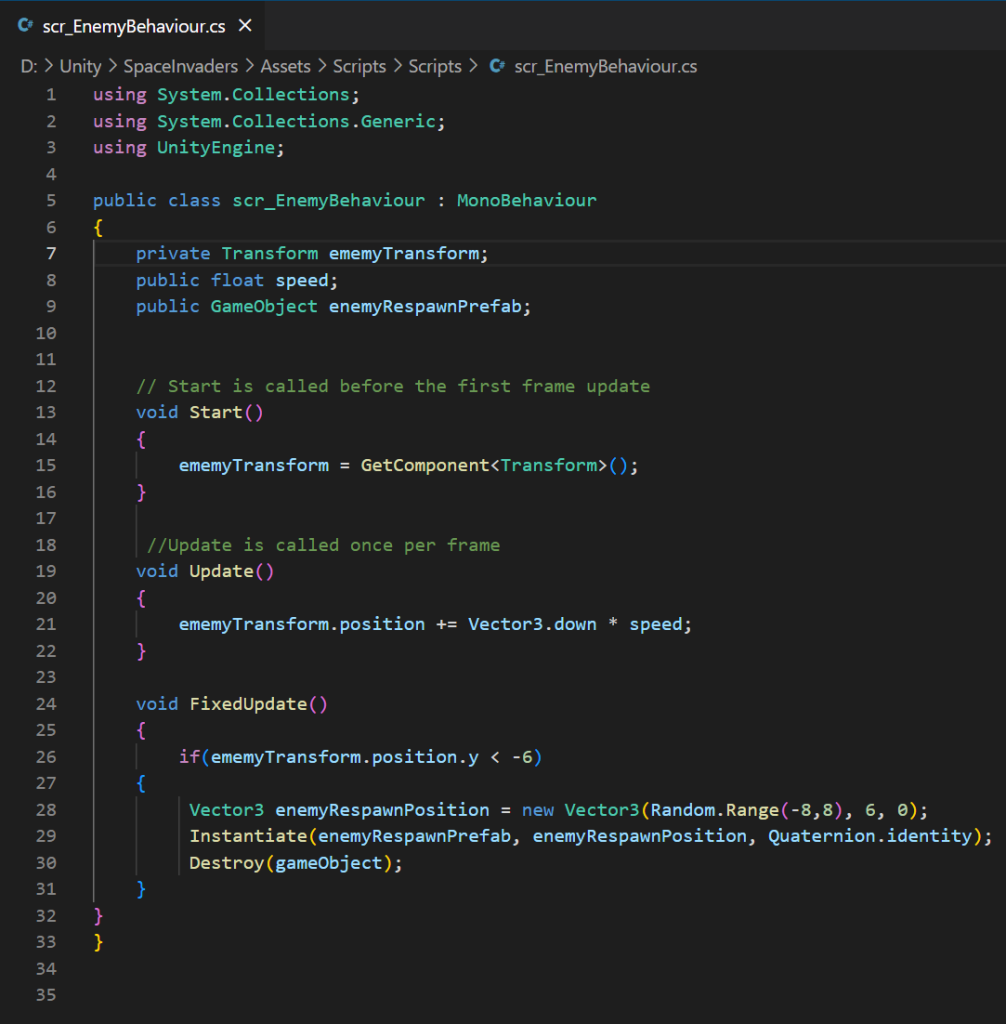
Like the bullet script, this script includes a update function which constantly moves the enemy once it’s spawned except this sprite will move down instead. This similarity also includes the speed variable determining the enemy’s velocity.
The script will also destroy the enemy if it passes the player and moves beyond the coordinate y: -6. This is for the same reason as to why the bullet gets destroyed of preventing lag in the game causing a inconsistent player experience.
After the enemy is destroyed from moving mast the threshold, it will spawn another enemy at the top of the screen for the player to destroy and therefore continues the game.
The final script that was implemented into the Space Invaders clone is the Score Manager script.
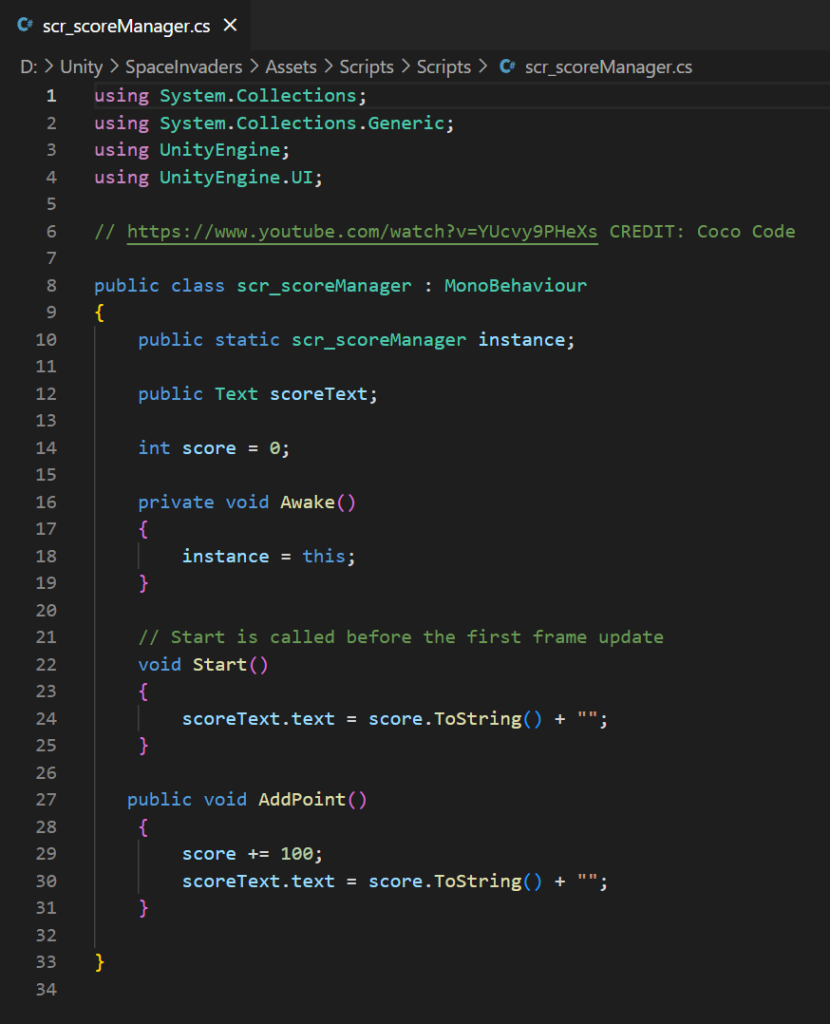
This script is credited to the YouTube, Coco Code and I used it to add a scoring system into my game every time the player destroys an enemy. A function of this script was mentioned in Bullet Behaviour’s OnTriggerEnter2D function to be able communicate with the script shown so it can add 100 points every time when the enemy collides with the player’s bullet projectile.
Game Sprites


These three sprites are what I added to my game after I had finished the video tutorials.
I used Adobe Photoshop to create them using text font references from the text font Cascadia, the font type used in visual studio.
Both of the enemy and bullet game objects are saved as prefabs within the game so that they can be duplicated multiple times in order for them to be used again. Without this the game’s enemies wouldn’t be able to reappear at the top of the screen after being destroyed and the player wouldn’t be able to shoot.
Typography
The only text box present on the game scene view is the score counter which keeps track of the current player score in relation to each enemy the player destroys using their projectiles. The font I used is from Dafont.com and is called VCR OSD.
I chose this particular font because it reminded me of the fonts used on classic arcade machines which was the platform the original Space Invaders was played on in arcade centres. This font therefore tries to recreate this aesthetic arcade machines had implemented into their games.
What I Learned…
One of the thing I learned when working on this project is the importance of prefabs in a game, especially if there is going to be multiple of the same enemy. This is because it can severely damage the game’s performance overtime and hinder the player experience.
I picked up how to spawn enemies within a random linear range from each side of the screen. This is useful to know as I’m able to respawn prefab enemies whenever a current enemy is destroyed, which can be used for any other arcade style games in the future.
Last thing that I learned during this prototype is how player movement works and how to have that movement manually controlled by the player or automatically controlled by scripts whenever a game object is spawned or if a event triggers the game object to move a particular direction.
What I would change/add…
The first thing I would add is to add background art into the game. This is because even though the use of current black background is acceptable, a more artistic pixel art design in the background will enhance the visual appearance of the game and will provide a higher quality playing experience to the user.
A aspect that this game is missing is a starting and death screen so that the player is is able to lose the game if too many enemies get past the threshold. This can also be backed up with a health system to give the player lives. The reason why this feels necessary is because the game feel like there’s no risk as every time the enemy gets past it respawns with no consequence on the player.
Though I like how the current version is now, it may result in a better play experience if there are multiple enemies on the screen at once. For this the enemy movement would have to be divided by the amount of enemies at least including a shorter cool-down time for the player’s projectiles.
Last thing I would add is to include OneShotCode into the game so that the enemies don’t make the sound effect when they get destroyed after passing the player sprite. This is because the current version may break the illusion that there are constant multiple enemies coming after them.